Learn Digital Scrapbooking
pros and cons, free downloads, tutorials, printing options
Learn Digital Scrapbooking – Find out the good and the bad, where
to get free digital scrapbooking kits, see my favorite tutorials and
read about where to have your layouts printed.
Scroll down to find free digital scrapbook software!
Learn Digital Scrapbooking – Pros and Cons – I'm still a bit new
to the digital scene as well but I think I can give you a good opinion
because of that. I have scrapbooked for years and have a degree in
interior design and I just plain love design! Can you feel the
enthusiasm? You can read about my digital journey over at
my blog
Even though I like what I've seen so far, I don't think I'll be giving
up the real thing any time soon. So here's what I like about digital
scrapping so far:
Pros – The supplies are reusable! When you download elements, you
can use them over and over again. I also like that I can import my
photos into my software and don't have to have them printed before I
start a layout (the old style way). I didn't have to decide what size I
wanted the photos. I could shrink or expand them to any size! It gave me
some extra creativity with the layout. You can also recolor your
elements to match whatever other element you are using. So, if your
digital embellishment doesn't coordinate with your digital paper, just
change it! That is super cool! You don't have to go searching all you
favorite stores for something to go with your layout it progress. I also
like that you can browse all the online digital stores any time for
exactly what you need and get it instantly downloaded! There are lots of
free digital downloads and free digital kits out there too! How cool is
that?! I love it!
Cons – However, there where a few things I didn't like so much. I
like some of the super creative ideas that I've used over the years for
my traditional scrapbook layouts. I like to add mini accordion albums
to my pages and paperbag pocket techniques for slipping in souvenirs and
such. I also like to just quickly add other stuff...kid's
drawings...you name it. I guess you could probably just leave a space on
your digital layout and add the accordion album or paperbag or pocket
later?! I think you'd call that hybrid scrapbooking. So, it might not be
a con after all. I still have some experimenting to do. Join me over at
my blog
and follow along as I learn more.
Learn Digital Scrapbooking – Resources #1 -
ScrapGirls.com
- If you want a very simple overview of digital, you can find an e-book
over at scrapgirls.com. I went there first when I started this page. The
e-book is called 15 things you NEED to know to become a GREAT digital scrapbooker.
It gives a really good overview and includes topics like what kind of
software to use, computer needs and organizing your digital files. They
also have a free sample digital kit you can download and 3 simple video
tutorials. For all of these resources, visit their site and scroll down
to Ready to Get Started? I like the tutorials over at TwoPeas better.
Learn Digital Scrapbooking – Resources #2 –
TwoPeasinaBucket.com
- I LOVE this site. I learned SO much from the Digi 101 class. You can
find it by hovering over the Classes and Events tab on the top nav bar. Then click on the Free Classes link in the drop down menu. Scroll down to almost the bottom of the page and you'll see the Digi 101 class. In fact, I created my first
digital scrapbooking layout after watching the January class tutorials. I
did have to do a little poking around on my own but most of what I
needed was in those 3 videos. You'll LOVE them too!
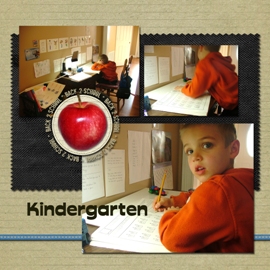
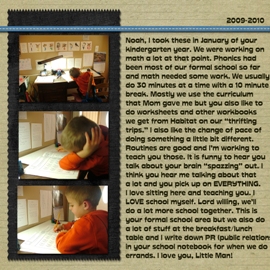
And here's the simple 2 page layout I created in 2-3 hours over a couple of evenings:
 |
 |
Learn Digital Scrapbooking – Find Tutorials on YouTube: Type in Digital Scrapbooking Tutorials in YouTube and you'll find hundreds. I'll share my favorites on
my blog
as I go along this learning journey. Don't get overwhelmed! Just take it one step at a time.
Learn Digital Scrapbooking – Free Digital Scrapbooking Kits and Downloads -
DesignerDigitals.com
- Enter free into the search box and then choose the first
result. You'll then see a link to digital freebies. You have to register
for their forum.
The Lily Pad.com
- Click on Store on the top nav bar and then Free Products on the bottom left nav bar.
PeppermintCreative.com
- Go to peppermintcreative.com and click on the FREE tab on the
top nav bar. I really like this site. I had a question and emailed them
one evening and had a response first thing the next morning!
ScrapGirls.com
- You can get freebies with each newsletter edition. So, sign up! I did!
Learn Digital Scrapbooking – Where to Print Your Finished Layouts – I found
this forum
discussion very helpful. After reading their reviews, I chose
SbtoShare.com. I ordered my sample package late one evening and when I
got up the next morning, I already had a ship notification! : )
Learn Digital Scrapbooking – Free Software! - I have not used
this software, but it was mentioned in the class that I took over at
TwoPeas. It is apparently a lot like Photoshop Elements and will work
with the Digi 101 class at TwoPeas.
Go to GIMP.org.
Find more learn digital scrapbooking resources....




New! Comments
Have your say about what you just read! Leave me a comment in the box below.